 Goblin
Convert is a Clipbar action. Select $100, 5 km, 72°F or 3pm PST and Convert answers on one line, in the result window. It only appears when your selection reads as one of these things. Use it when you meet a price, a measurement or a meeting time in another currency, system or zone.
Convert a selection#
- Turn on Clipbar if you haven't. See Turn on Clipbar.
- Select an amount, a measurement or a time in any app, such as
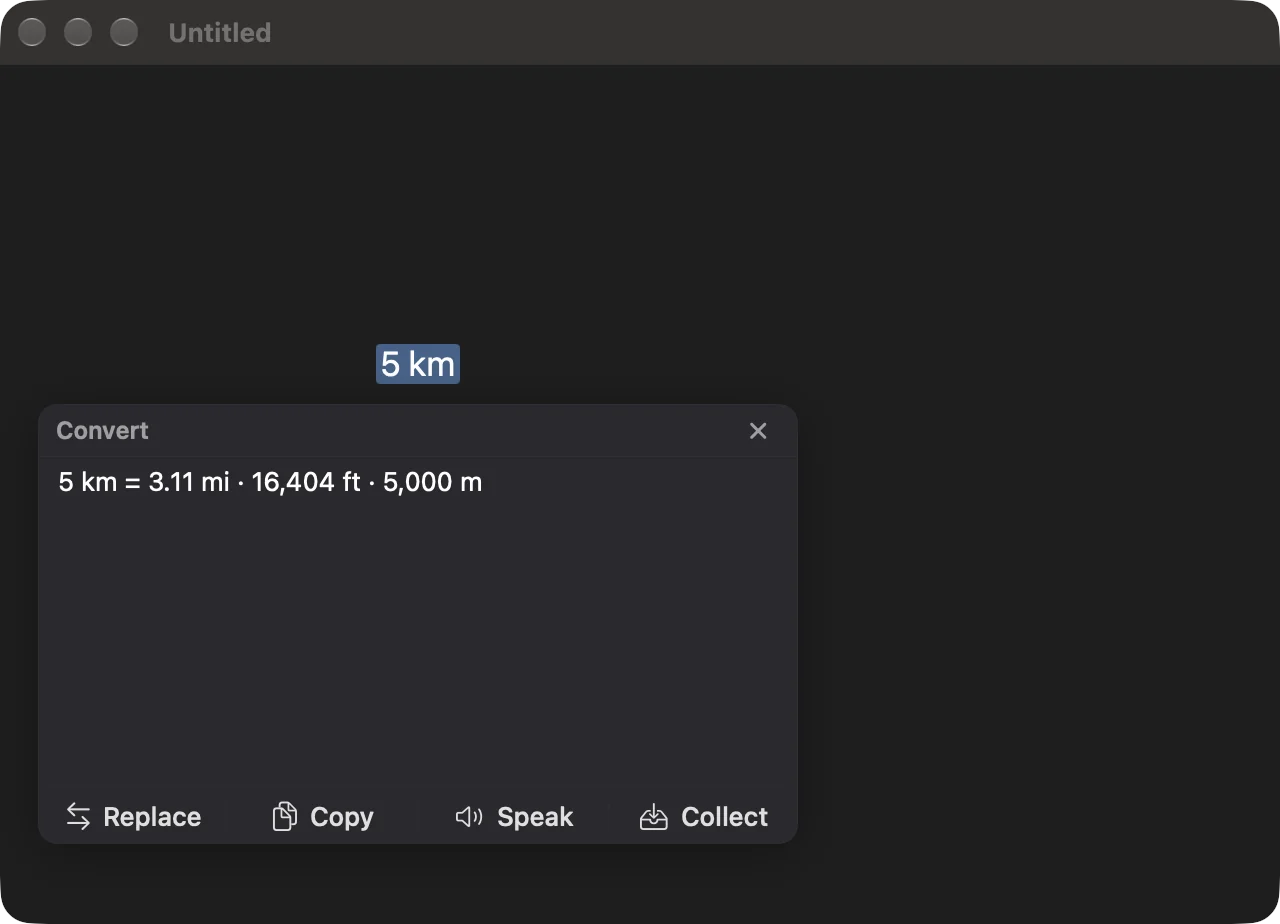
5 km. - Click Convert on the bar. If you don't see it, click ⋯, or press ⌃⌥K and type
convert. - The result window shows the answer, such as 5 km = 3.11 mi · 16,404 ft · 5,000 m. Click Copy to keep it, or edit it first.
If Convert isn't on your bar, add it: see Add an action to the bar.
Currency#
Convert reads an amount with a symbol or a code, in front or behind: $1,240.50, € 12,50, 99 $, 200 kr, USD 99, 99 EUR, GTQ 1.2k. It copes with both 1,240.50 and 1.240,50. A suffix of k, m/mm or bn/b multiplies the amount ($1.5k, 3m GTQ).
- More than 150 currencies. Convert knows 158 world currency codes. Crypto and metals aren't included.
- Your currencies first. The answer leads with your Primary currency, which starts as the one your Mac's region uses. With a Second currency set, the line shows those two. Without one, the usual US dollar, euro and pound fill it up to three. Amounts show two decimals, and none for currencies that have no minor unit, such as the yen.
- Rates. The first time you convert a currency on a day, Goblin fetches the day's rates over the internet from a free currency feed (with the European Central Bank's daily rates as a fallback), and keeps them for 24 hours. It never fetches at launch or in the background. If the fetch fails, Convert uses the older copy it has, however old, and says "Couldn't get exchange rates" if there is none.
When a symbol could mean several currencies#
$, kr and ¥ stand for more than one currency. Convert reads them like this:
- A currency you picked for that website. Goblin remembers a choice per site.
- If the selection came from a browser page, the site: a few known sites (for instance a Swedish classifieds site means SEK), then the country in the address (
.cais Canadian dollars,.com.auAustralian)..com,.organd.netsay nothing. - Otherwise the symbol's usual meaning: US dollars, Swedish kronor and Japanese yen.
When the site decided it, the answer ends with a note such as "($ as CAD for example.ca)".
Change which currency a symbol means#
- Select the amount and click Convert.
- In the result window, click the menu beside the title and choose a reading, such as Treat $ as CAD. Or hold ⌥ while you click Convert to get the same list on the bar.
- The answer updates, and Goblin remembers the choice for that site.
To undo it, go to Settings›Clipbar›Convert, find the site in the list at the bottom and click Forget.
The $ list covers USD, CAD, AUD, NZD, MXN, ARS, CLP, COP, HKD, SGD and UYU, kr covers SEK, NOK, DKK and ISK, and ¥ covers JPY and CNY.
Measurements#
Convert reads a number and a unit, 5 km, 72°F, 1.5 GB, 3 tbsp, and shows the other readings that make sense: the other measuring system first, then one more in the same system. Units have many spellings (km, kilometers, kilometres; lb, lbs, pounds) and the check ignores case.
| Kind | Units |
|---|---|
| Length | mm, cm, m, km, in, ft, yd, mi |
| Area | m², km², cm², ha, ft², in², yd², mi², acres |
| Mass | mg, g, kg, oz, lb |
| Volume | ml, L, tsp, tbsp, fl oz, cup, pt, qt, gal |
| Speed | mph, km/h, m/s, knots |
| Temperature | °C, °F, K |
| Data | B, KB, MB, GB, TB, and KiB, MiB, GiB, TiB. A decimal size also shows a binary one and the reverse. |
| CSS | px, pt, em, rem |
| Pressure | Pa, kPa, bar, psi, atm |
| Energy | J, kJ, cal, kcal, Wh, kWh, BTU |
| Power | W, kW, MW, hp |
| Duration | ms, s, min, h, days, weeks |
| Fuel economy | mpg (US), mpg (UK), L/100 km |
Some units, like yards and teaspoons, are understood in a selection but never offered as an answer.
Sizes in CSS depend on two settings: points use the Pixels per inch value, and em and rem use the Base font size.
Times and time ranges#
Convert reads a time with a zone and shows it in your zone: 3pm PST, 15:30 UTC, 9:05 a.m. CEST, noon EST, 8pm UTC+2, 9am Tokyo. The answer looks like 3:00 PM PST = 6:00 PM EST, with "(next day)" or "(previous day)" when the date differs.
- Zone names. Abbreviations (PST, CET, IST, JST and others), UTC and GMT offsets, region names (Pacific, Eastern, Central, Mountain), many cities and countries (NYC, SF, London, Mumbai, Tokyo, Germany), and any city in the system time zone list. Region names follow daylight saving. Ambiguous abbreviations take the common reading: CST is US Central, IST is India, BST is British Summer Time.
- Time ranges.
9am-5pm PT,9–5 EST,09:00-17:30 CETor9 to 5 Londonconvert both ends:9:00 AM – 5:00 PM EST = 6:00 AM – 2:00 PM PST. With no am or pm, numbers up to 12 are read as a business day: 7 to 11 are morning, 12 and 1 to 6 afternoon. A leading zero, or a number over 12, means 24-hour time. A range that passes midnight rolls into the next day.
Colors#
A selection that reads as a color gets its own action, Color, instead. It understands hex, rgb(), hsl(), oklch() and oklab() (with CSS percentages and an optional / alpha), and shows the hex, rgb(), hsl() and oklch() forms together. The clipboard's Copy as menu offers oklch() and oklab() as well; see Transforms and color formats.
Set your currencies and CSS sizes#
- Open Settings›Clipbar and scroll to Convert.
- Next to Primary currency, choose the currency answers should lead with.
- Optionally choose a Second currency.
- Use the arrows beside Base font size (em, rem) and Pixels per inch (pt) to change the CSS sizes.
The settings:
| Setting | What it does | Default |
|---|---|---|
| Primary currency | The currency answers lead with. | Automatic (from your Mac) |
| Second currency | An optional second currency beside the first. | None |
| Base font size (em, rem) | Pixels in one em or rem, 6–72 px. | 16 px |
| Pixels per inch (pt) | Pixels per inch for points, 36–600 PPI, in steps of 12. | 96 PPI |
| Websites | One row per site you corrected, such as "$, kr, ¥ mean CAD", each with a Forget button. Shown once you have one. | None |
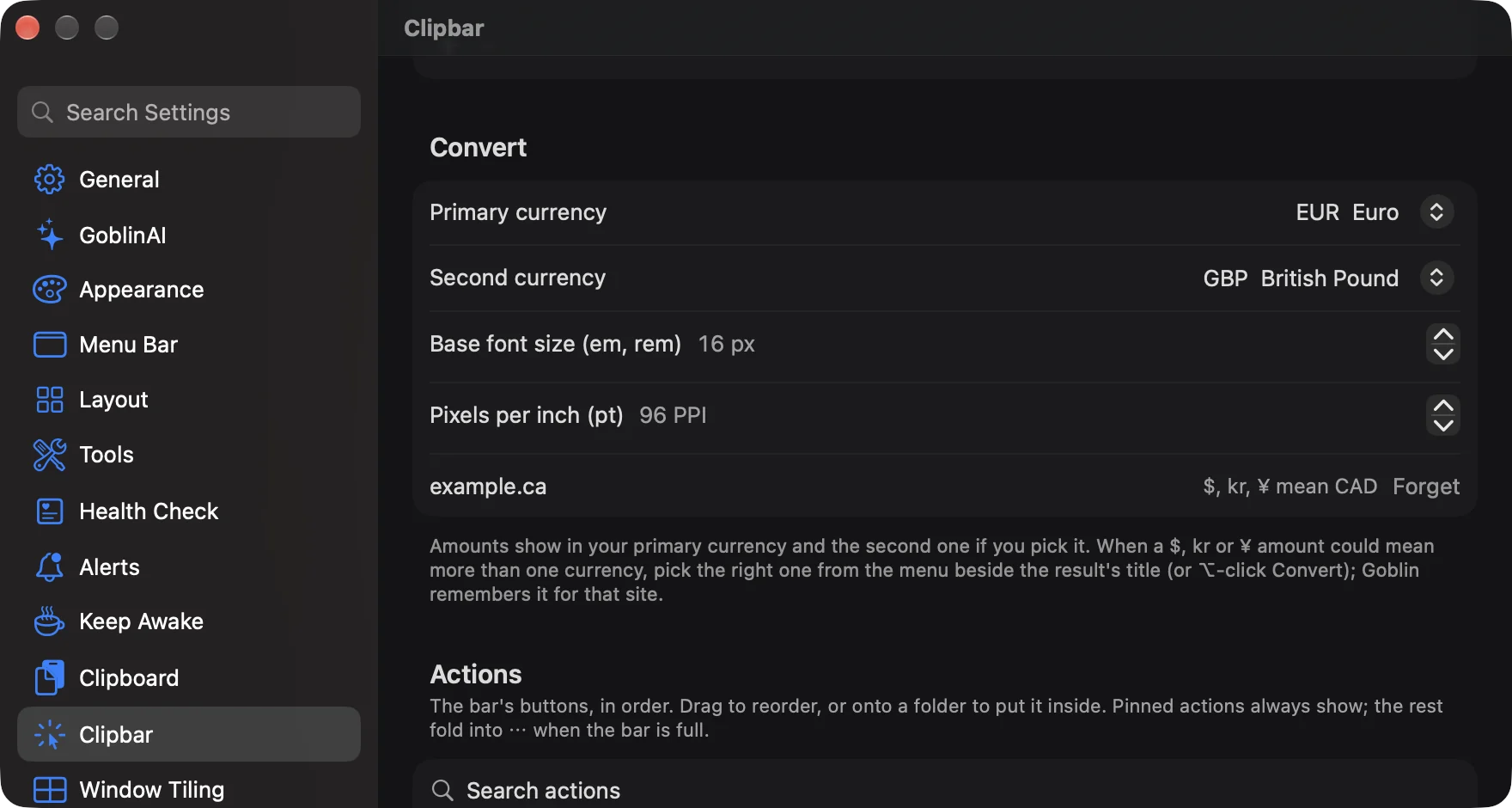
The currency pickers list each code with its name, such as "EUR Euro". These settings follow your iCloud sync choices.